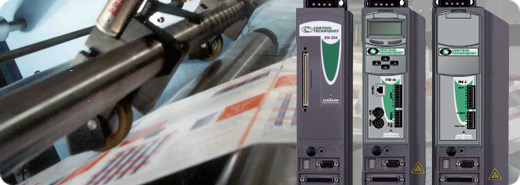 

4.5 - 13.0 A rms (9 - 26 Peak)
90-264 Volts
1.5 Axis Servo Drive
The base EN drive can be used as a stand alone servo axis
with integrated motion control or it can be easily controlled with single
and multi-axis controllers, PLCs and host controllers. The base amplifier
comes equipped with features suited for centralized control
architectures. By adding snap on modules additional motion control
features can be easily added to the drive making it a complete stand
alone 1.5 axis servo system.
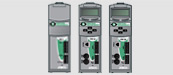
FM control modules provide EN drives with “snap-on”
functionality for Indexing (FM-2), Programming (FM-3E), and Advanced
Programming (FM-4E). This modular approach allows users to choose the
level of advanced machine control they need, based on the applications
requirements and supporting scalability and our "buy what you
need" philosophy. The MDS motion functionality can be
easily scalable by adding on FM modules.
The analog torque or velocity modes can be used with
classic position controllers using analog outputs and encoder inputs. The
pulse mode is ideal for use with low-cost PLC stepper controllers. This
drive works in a variety of applications where a host control provides a
command signal determining the desired motion profile. The EN Drive is
configurable for seven flexible modes of operation, and the parameters
for each mode can be adjusted to tailor the drive to the specific
application using our Windows™-based PowerTools Pro™ software. Base
drive features include:
-
Position Tracker – Analog Mode
-
Analog Torque Mode
-
Analog Velocity Mode
-
Digital Velocity Preset
-
Pulse Mode
• Pulse/Pulse
• Pulse/Direction
• Pulse/Quadrature
-
Summation of Analog Velocity and Digital Velocity
Applications
In these applications energy efficiency and productivity
improvements often result in a rapid return on project investments.
Benefits
-
Programmable I/O
-
5 optically-isolated inputs (1 dedicated)
-
3 optically-isolated outputs
-
1 analog input ±10 VDC, 14-bit
-
2 analog output ±10 VDC, 10-bit
-
Programmable encoder output, (up to 8,192 lines per
revolution)
-
Separate stop and travel limit decel ramps
-
Torque, Travel, Following Error and velocity limits
-
8 user defined speed presets with individual accel/decel
rates
-
2 Programmable Torque Level Outputs
-
In Motion Velocity Output
-
Auto-Tune
-
Software Oscilloscope
Options
FM control modules provide EN drives with
“snap-on” functionality for Indexing (FM-2), Programming (FM-3E), and
Advanced Programming (FM-4E). This modular approach allows users to
choose the level of advanced machine control they need, based on the
applications requirements and supporting scalability and our "buy
what you need" philosophy. For applications requiring traditional
multi-axis control, our MC controller is easily integrated with a single
cable connection. These modules are programmed using the our PowerTools
Pro software.
FM Modules
FM-2 Indexing Module
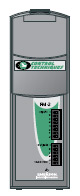
The FM-2 module enhances EN drives by
adding positioning capability including Jog, Home, Index functions
including Position Tracker™ – Fieldbus Indexing. The FM-2 also
includes additional I /O providing 8 digital inputs and 4 digital
outputs.
Operating information is set up via our free
configuration software PowerTools Pro. The FM-2 is designed to be
extremely easy to set up and run. This saves time and money during
installation and also makes long term support a breeze. For any simple
point to point motion application, the FM-2 indexer is the right choice.
|
|
FM-2 Application
Examples
-
Clutch-brake replacement
-
Extend-retract arm
-
Indexing table
-
Indexing conveyor
|
FM-3E Programming Module
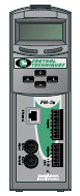
The FM-3E Ethernet module transforms the EN into a fully
programmable single-axis motion controller, and adds 8 digital inputs and
4 digital outputs. Profibus (FM-3PB) and DeviceNet (FM-3DN) options are
also available.
The FM-3E Ethernet Programming Module allows the user to
create programs to sequence motion, I/O control, and other machine
operations in one environment. These programs used in conjunction with
the Assignments or “virtual wiring” feature, provide the user with a
powerful and easy-to-use programming environment.
With removable terminal block connectors for I/O and a
pluggable sync cable for master encoder connections, setup of the FM-3E
hardware is quick and clean. For diagnostics, the LCD keypad display on
the front of the module gives the user a quick and handy way to change
parameters, monitor feedback parameters, check module and drive
revisions, change baud rates, view I/O states, and much more.
Other versions of the FM-3; Profibus (FM-3PB) and
DeviceNet (FM-3DN) options are also available.
|
|
FM-3E Application
Examples
-
Tension control
-
Flying cut off
-
Auger filler
-
Registration control
-
Slip compensation
|
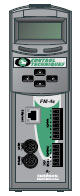
FM-4E Advanced Programming Module
The FM-4E Advanced Programming module has taken all of
the features and flexibility of the FM-3E, and added the ability to
create complex motion profiles for sophisticated applications that are
easy to set up with our intuitive PowerTools Pro software.
The FM-4E adds versatility and extends functionality by
including high speed data capture, summation of multiple motion profiles,
position capture object, queuing, multiple profile summation, program
multi-tasking, and an array of parameters suitable for even the toughest
applications.
The FM-4E module is the perfect solution for applications
with complex motion profiles such as a random infeed conveyor, rotary
knife, or high speed labeling machine. Using the same software as the
FM-3E, PowerTools Pro makes programming the FM-4E quick and easy.
Other versions of the FM-4; Profibus (FM-4PB) and
DeviceNet (FM-4DN) options are also available.
|
|
FM-4E Application
Examples
|
Software
Control Techniques' software suite makes it easy to
access the complete feature set of our drives. These tools provide quick
setup of the drive, optimize tuning, configuration back-up, programmable
control and communications link set up.
-
PowerTools Pro -Drag & Drop, Comprehensive
help, Motion Profile Setup, User Units, Motor Auto-tune, Electronic
Gearing, Network Configuration, and many other advanced features. So
intuitive you can set up motion in minutes
-
CTSize - Drive sizing software for servo drives
The Software tools communicate using Ethernet,
Serial (232 or 485) or USB connections. Ethernet allows the software
tools to easily use the internet infrastructure allowing Control
Techniques drives to be accessed remotely, from virtually anywhere around
the world.
PowerTools Pro
Developing motion applications with PowerTools Pro is a
simple “five step, top-down process”. The five steps are displayed
within an explorer bar that allows easy intuitive navigation. Each step
is configured using simple check boxes, drop down selections and drag and
drop functionality. The five steps are:
-
Hardware Configuration
-
Drive Setup
-
I/O Setup
-
Motion
-
Programs
PowerTools Pro is free of charge and can be obtained
by clicking the download tab on this page.
A “BASIC”-like programming language enables users to
develop more complex applications and sequencing with functions being
selected by dragging and dropping onto the work area.
Our free PowerTools Pro
software enables you to fully realize the power of the Epsilon EP servo
systems. A familiar Microsoft® WindowsTM interface
provides operators and machine builders with the tools needed to access
everything they need for complete servo control — Motion Profile Setup,
User Units, Motor Auto-tune, Electronic Gearing, Network Configuration,
and many other advanced features.

Assignments
– Use our "Virtual Wiring" to create programs right out of
the box, without writing a single "line of code." For example,
on the assignment screen simply drag-and-drop the desired machine
function onto the digital inputs and outputs.
Indexes –
Setting up indexes is easily accomplished by filling in the screen’s
blanks to create an index profile. Select from Incremental, Absolute,
Registration, or Rotary Plus and Minus types. Choose the time base of the
index by selecting either real time or synchronized to a master.
Network –
Whatever fieldbus you are using, setting up network communications is
quick and easy. Fill-in-the-blank, drag-and-drop procedures are used to
get your drives communicating. PowerTools Pro diagnostics couldn’t be
more intuitive, allowing real-time monitoring of the actual data being
sent and received.

Camming –
Cam data is easily entered within PowerTools Pro, and the Cam graphing
tool is second to none, with multiple interpolation types available.
Drive
Sizing Software for Servo drives
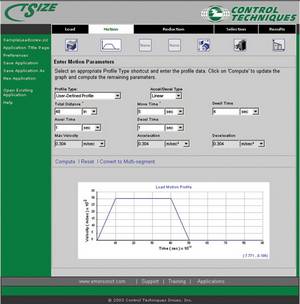
Sizing your
application is made easy with our free CTSize sizing software for Control
Techniques drives. Selecting the optimum system is simply done by going
through the five tabs: Load, Motion, Reduction, Selection and Results.
-
Start by
selecting one of the six pre-configured load types:
Lead screw, Rack and Pinion, Conveyor, Cylinder, Feed roll and User
Defined
-
Fill in the load details on the load tab
-
Next, enter the load’s motion profile, making use of
profile type shortcuts or creating multi-segment profiles
-
For speed reduction select from Belt/Pulley, Gear/Gear,
Chain/Sprocket,
or Gearbox for up to three separate stages of reduction
-
Use the selection tab to select from all products or
narrow
your search to a specific drive and/or motor
-
The results tab will display the optimum motor/ drive
combination for your application
|